


GIPHY: GIFs, Stickers & Clips
3.813.17K Reviews
App Specs
- Version
- 4.19.2
- Updated On
- License
- Free
- Downloads
- 50,000,000+
- Developer
- Giphy, Inc.
- Categories
- Video Players & Editors
- Platform
- Android, iOS
Screenshots
 Analysis by AppCompare
When it comes to expressing ourselves in the digital world, sometimes words just don't cut it. That's where GIPHY: GIFs, Stickers & Clips comes into play. If you're like me and love adding a little flair to your conversations, this app might just be your new best friend. Let me walk you through my experience with it.
First Impressions and Interface
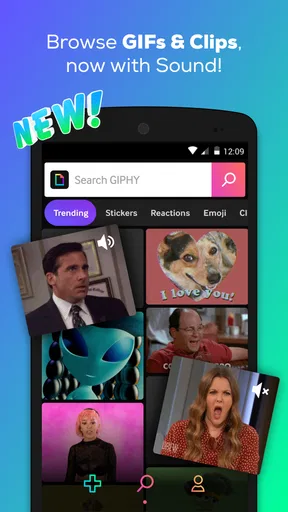
Upon downloading GIPHY: GIFs, Stickers & Clips, I was immediately greeted by a vibrant and intuitive interface. It's like stepping into a candy store but for digital content. Everything is categorized neatly, making it easy to find exactly what you're looking for. Whether it's a trending meme or a classic reaction GIF, it’s all just a few taps away.
The search functionality is robust, which is a huge plus in my book. You can search using keywords, and the app does a great job of pulling up relevant results. It's almost scary how accurate it is, like it knows exactly what you're thinking. Spooky, right?
Features That Stand Out
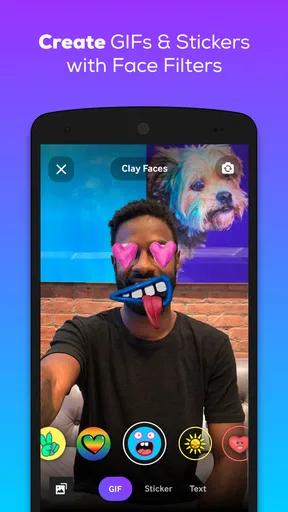
One of the cool features is the ability to create your own GIFs. Yes, you heard that right! You can record clips or even use existing videos and transform them into GIFs. The editing tools are pretty straightforward, so even if you’re not tech-savvy, you’ll manage just fine.
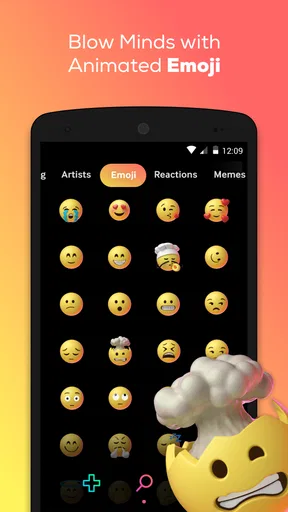
Another feature I love is the sticker library. It’s vast and constantly updated. Whether you need a cute cat sticker or something quirky to spice up your chats, GIPHY’s got you covered. And let’s not forget about the clips! Short, looping videos that you can share just as easily as GIFs.
Integration and Sharing
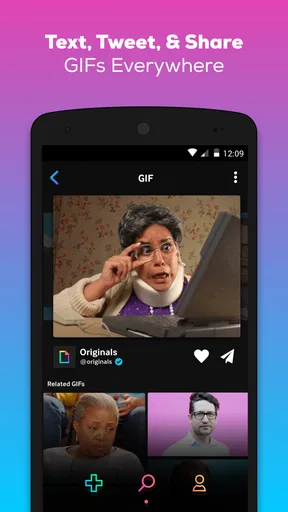
Let’s talk about integration because this is where GIPHY shines. You can share GIFs across multiple platforms directly from the app. Whether you’re on social media or messaging apps, it’s seamless. I found myself peppering my group chats with GIFs in no time. My friends were either delighted or slightly annoyed, but hey, it’s all in good fun.
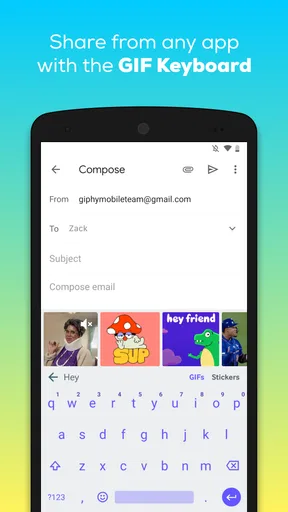
It’s also worth mentioning that GIPHY integrates with your keyboard, allowing you to access it without leaving your chat. This is a game-changer for those of us who love to express ourselves visually.
Worth Reading Before You Choose

Flipboard Shows What News Apps Must Do Beyond the Feed

Switching to Android Auto Means Rethinking Your Driving Routine

Google Calendar Makes a Crowded Week Easier to Manage

Ludo King Makes the Most of the Minutes Between Plans

Baby Panda World Brings Quick Play to Modern Phones, but Its Game Library Feels Busy

ESPN’s Live Game View Makes Following Close Games Easier
Finding the right reaction without losing the moment
The best way I’ve found to use the search is to describe the feeling or action, not just the subject. Searching for a mood such as “awkward,” “relieved,” or “not impressed” can be more useful than searching for a broad topic like “office.” If the first results are too literal, I narrow the wording or try a related expression rather than scrolling through every result. That small habit makes the app feel quicker during an active conversation.
There is a trade-off, though: a huge library gives you plenty of choice, but it can also turn a simple reply into a browsing session. I try to pick the first result that clearly fits the tone instead of hunting for a perfect GIF. In a fast-moving group chat, timing often matters more than finding the most obscure reference.
A practical workflow is to search before opening the chat if I know I’ll need a particular reaction, then share it when the moment arrives. For an everyday example, if a friend sends a picture of a kitchen experiment gone wrong, I can look for a surprised or sympathetic reaction, choose a short loop, and send it without composing a whole paragraph. That works best when the GIF adds warmth or humor; for serious news, I’d rather reply in words.
Creating clips with a purpose
Making a GIF from a video is most useful when I already have a brief moment in mind: a wave, a pet’s expression, or a small action that makes sense on its own. I’d keep the source clip short and focus on one clear beat. A long clip is harder to turn into a quick reaction, and the point can get lost once it loops. Before sharing, I’d check that the movement reads clearly without the context of the original video.
Creation is a different use case from searching the library. The library is better when I need a familiar reaction quickly; making something myself is more personal, but takes extra steps and depends on having a suitable video or recording a clip. I wouldn’t open the editor for every reply. It makes more sense for a running joke with friends, a memorable moment from a day out, or a reaction I expect to reuse.
Stickers also suit a different job from GIFs. I reach for one when I want a compact visual accent, while a looping GIF is better when the expression or motion carries the joke. Clips can be more video-like, so they may feel more vivid, but that extra motion is not always welcome in a busy chat. Matching the format to the conversation keeps a playful exchange from becoming noisy.
Keyboard convenience and sharing choices
Accessing GIPHY from the keyboard can save a few taps when I’m already writing a message, but it is worth treating that convenience as a shortcut rather than the only way to browse. If I’m unsure what I want, opening the app gives me more room to search and compare options. If I already have a phrase in mind, the keyboard route is the quicker fit. Either way, I still check the recipient and conversation before sending; a funny image can land very differently in a work chat than in a close-friends group.
Sharing directly is handy when the destination is supported by the options available on my device, while copying or choosing another share route can be more practical when I want to move the image elsewhere. The useful distinction is that GIPHY is a discovery and creation tool, not a replacement for every messaging app’s own media picker. If I mainly want to send a photo or a personal video, I’ll use the chat app’s normal attachment controls instead.
Because the app is built around visual material, I also think about context before using a result. A meme can rely on sarcasm or a cultural reference that doesn’t travel well between audiences. For a close group that knows my humor, that’s part of the fun; for someone who may read it literally, plain text is safer. This is less a limitation of the search tools than a reminder that a quick image still needs judgment.
Performance and Reliability
Performance-wise, the app runs smoothly. I didn’t experience any lag or crashes during my time using it, which is always a relief. It’s responsive and fast, which is crucial when you’re in the middle of a heated GIF-off with your pals.
In terms of reliability, the app consistently delivers high-quality GIFs and stickers. I haven't run into any issues with broken links or missing images, so it gets a thumbs up from me in that department.
There are still moments when the experience can feel less immediate than a plain text reply. Choosing among similar search results takes attention, and animated media can be distracting when a conversation is already moving quickly. I also wouldn’t assume every recipient wants a stream of loops; some people prefer concise messages or have limited patience for visual clutter. I use GIFs as punctuation, not as a substitute for every response.
How it compares with other ways to find GIFs
Compared with using the GIF search built into a messaging app, GIPHY is most appealing when I want to browse beyond one conversation or make something of my own. A built-in picker can be faster for a one-off reaction because I never leave the chat. GIPHY’s dedicated app gives the search-and-discovery process more focus, and its keyboard integration narrows that gap when I want to stay in the conversation.
Compared with general video-editing tools, this is a lighter choice for turning a short moment into a shareable loop. I would choose a fuller editor when I need precise control over a longer video or a more involved finished project. GIPHY makes more sense when the goal is simply to capture one amusing or expressive beat. It is not trying to replace a complete editing workflow, and I see that as a sensible boundary rather than a flaw.
It is a free app from Giphy, Inc. in the video-player and editing space, and its audience is broad: it has passed 50 million installs and holds an average rating of 3.8 from around 231,000 ratings. It is rated Teen, so I wouldn’t treat the library as automatically suitable for every younger viewer or every setting. The app first appeared on March 25, 2015, and version 4.18.3 is listed for Android 6.0 and later. Those details make it easy to judge basic compatibility, but the more important question is whether you enjoy communicating with animated media.
Who will get the most from it
I’d recommend GIPHY to people who regularly send reaction images, enjoy finding a precise visual punchline, or want to turn a short personal video into a loop. It is especially useful for group chats where a familiar meme can communicate tone faster than a sentence. Creators who post casually may also appreciate having a simple route from a recorded moment to a GIF without switching to a larger editing project.
I’d skip it if I rarely use GIFs, prefer all media search to stay inside one messaging app, or find looping images distracting. It is also not the right tool when I need careful control over a polished video, or when a conversation calls for a thoughtful written response rather than a joke. If storage, bandwidth, or screen attention is a concern, using a built-in picker only when needed may be a more restrained approach than keeping a dedicated visual library at hand.
Final Thoughts
Overall, GIPHY: GIFs, Stickers & Clips is a fantastic app for anyone who loves to communicate with a bit of extra pizzazz. It’s easy to use, packed with features, and integrates well with other apps. It’s become a staple on my phone, and I’m sure it’ll secure a spot on yours too.
If you're ready to dive into a world of endless GIFs and stickers, I highly recommend giving GIPHY a try. It’s fun, versatile, and adds that little something extra to your digital conversations. So go ahead, download it, and let your creativity run wild!
Pros
- Vast library of GIFs available.
- Easy-to-use search functionality.
- Seamless integration with social apps.
- Allows creation of custom GIFs.
- High-quality GIFs and clips.
Cons
- Requires internet connection.
- Contains ads in free version.
- Limited editing tools.
- Occasional slow loading times.
- Account needed for some features.
FAQs for GIPHY: GIFs, Stickers & Clips
What is GIPHY: GIFs, Stickers & Clips used for?
GIPHY is a platform that allows users to search for, create, and share animated GIFs, stickers, and video clips. It is widely used for adding fun and expressive content to social media posts, messages, and even emails. The app provides a vast library of GIFs and also allows users to upload their own creations.
Is GIPHY free to use, or are there in-app purchases?
GIPHY is completely free to download and use. There are no hidden fees or in-app purchases required to access its extensive library of GIFs and stickers. Users can browse, share, and create content without worrying about any additional costs, making it an ideal choice for those looking to enhance their communication.
Does GIPHY require an internet connection to function?
Yes, GIPHY requires an internet connection to search for and download GIFs, stickers, and clips. While you can save GIFs to your device for offline viewing, the app needs to connect online to access its vast library, search for new content, and upload any creations you may want to share.
Can I create my own GIFs using GIPHY?
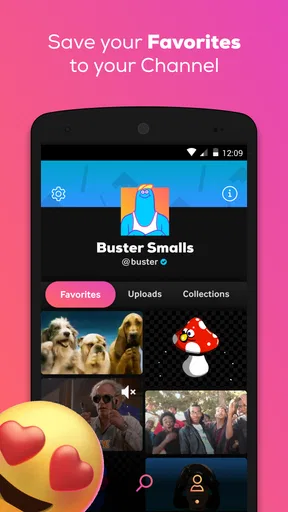
Absolutely! GIPHY includes tools that allow you to create your own GIFs. You can use your camera to record clips, or upload existing videos and images to transform into GIFs. The app also provides editing features like adding text and stickers to personalize your creations before sharing them with the world.
Is GIPHY compatible with all social media platforms?
GIPHY is compatible with most major social media platforms, including Facebook, Instagram, Twitter, and Snapchat. It allows seamless sharing of GIFs and stickers across these platforms, making it easy to enhance your posts and messages with engaging and humorous content. However, always check individual platform guidelines for any specific restrictions.


